How to Safely Combine Packages from Different Linux Distributions
Linux users often encounter the frustration of needing an application that isn't packaged for their specific distribution. The solution lies in a clever tool that allows you to mix packages from various distros without risking system stability. Through containerization, this tool creates isolated environments where you can run software from, say, Ubuntu on Fedora, or Arch on Debian. Below, we answer common questions about this powerful approach.
What exactly is this tool that lets you mix distro packages?
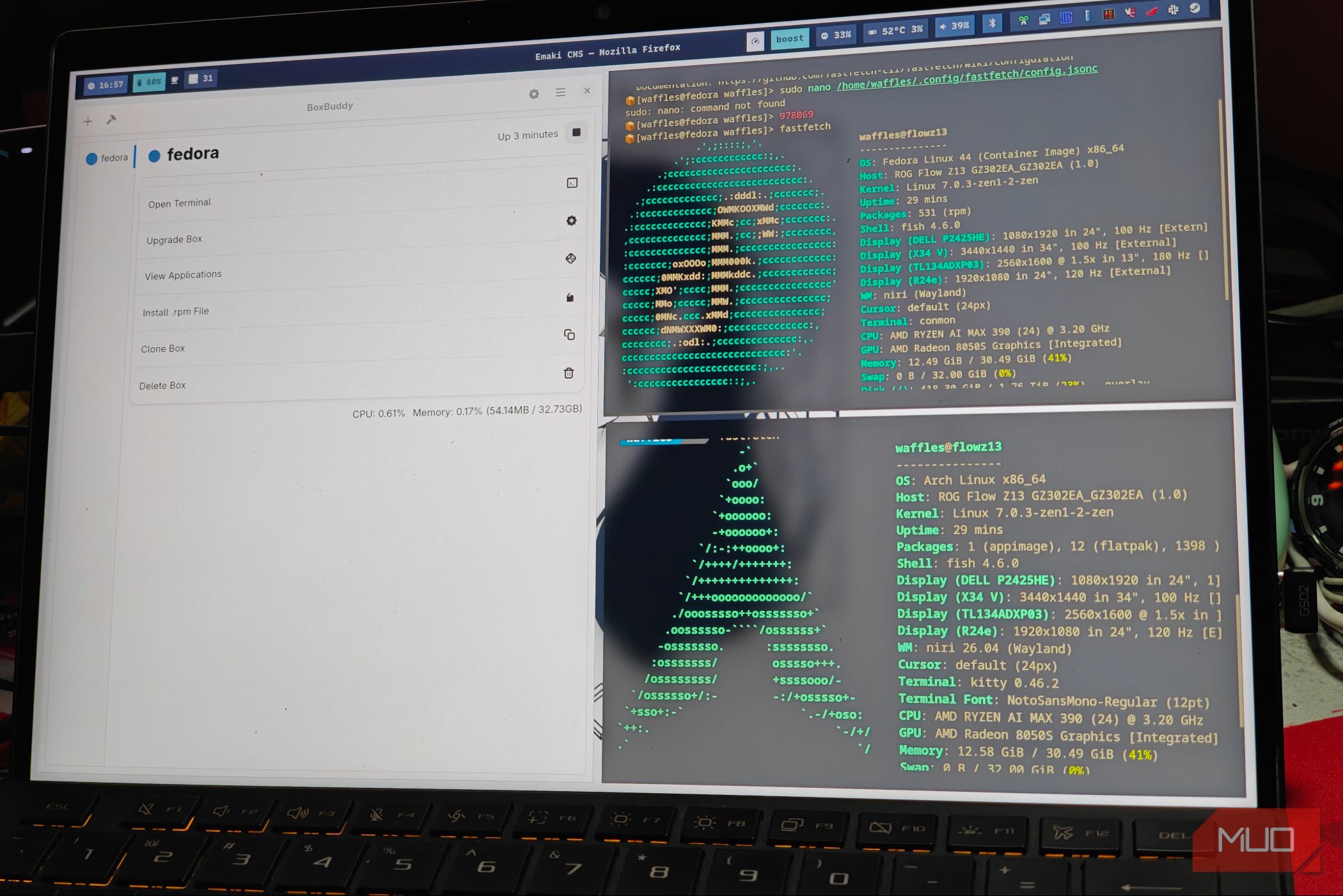
This tool is a container-based utility, most notably Distrobox (or similar like Toolbox), that leverages technologies like Podman or Docker to create lightweight, disposable environments. Inside these containers, you can install packages from any Linux distribution, and the tool seamlessly integrates the applications with your host system's desktop environment and file system. It works by mapping the container's graphical and audio subsystems to the host, so apps appear and behave as if they were native, even though they run in a different distro's userland.
How does it prevent breaking my main operating system?
The key is isolation. The tool runs each mixed-distro environment inside a container, which is a sandboxed space separated from your host system's core libraries and configurations. Any package you install within the container cannot modify the host's files or dependencies. Even if you accidentally break the container's environment, you can simply delete and recreate it without affecting your main OS. Furthermore, the tool uses user namespaces to ensure no root-level changes are made to the host. Your real system remains pristine, while you freely experiment with packages from Fedora, Arch, Ubuntu, or others.
What are the main benefits over using virtual machines or traditional package managers?
- Low overhead: Containers share the host kernel, so they consume far fewer resources than a full VM.
- Fast startup: Containers start in seconds, compared to minutes for a VM.
- Native integration: Apps from containers appear in your application menu and can use your host's file system, clipboard, and hardware acceleration.
- No system pollution: Unlike traditional package managers that can cause dependency conflicts, containers keep everything separate.
- Easy cleanup: You can delete a container and its packages instantly, leaving no trace.
Which Linux distributions can I mix and match with this tool?
Most major distributions are supported, including Ubuntu, Debian, Fedora, Arch Linux, openSUSE, Alpine, and many more. The tool works by pulling official Docker or OCI images of these distributions, then overlaying your desired packages. You can even use older versions or specialized flavors such as Kali Linux for security tools. The only requirement is that your host system has a container runtime like Podman or Docker installed. Once set up, you can create as many containers as you like, each with a different distro.
Does using containers for mixed packages affect performance?
Performance impact is minimal because containers run directly on the host kernel without emulation. CPU and GPU-intensive tasks, including graphics applications and games, usually enjoy near-native performance thanks to shared kernel resources and GPU passthrough support. However, there can be slight overhead from file system mapping and extra process isolation. In practice, users rarely notice a difference. The biggest trade-off is disk space if you keep many containers with different base images, but each image is stored efficiently using layers. Overall, the convenience and safety far outweigh the negligible performance cost.
How do I set up this tool to start mixing packages?
- Install a container runtime on your host: either Podman or Docker. For example, on Fedora:
sudo dnf install podman. - Install the mixing tool itself (e.g., Distrobox). Many distros have it in their official repositories. On Ubuntu:
sudo apt install distrobox. - Create a container with a specific distro image:
distrobox create --name my-ubuntu --image ubuntu:latest. - Enter the container:
distrobox enter my-ubuntu. - Inside, use that distro's package manager (like
apt) to install any software. When you exit, the app is available on your host's menu.
Are there any risks or precautions I should take?
While the tool is designed to be safe, there are a few cautions. First, avoid running containers with root privileges (using --root flag) unless necessary, as that can weaken isolation. Second, be mindful of shared directories: if you mount your home folder, any malicious package inside the container could access your personal files. Third, some applications may require kernel modules not present in the container (e.g., certain hardware drivers). Finally, keep your container runtime updated to benefit from security patches. Overall, with standard usage, the risk of breaking your host system is extremely low.
Internal links: Learn more about the tool itself, benefits, or setup steps.
Related Articles
- The End of an Era: 7 Key Insights into OnePlus's Merger with Realme
- The One Feature Your TV is Missing: Wide Viewing Angles Explained
- Inside BlackFile: A Defender's Guide to Detecting Vishing Extortion Attacks
- Vienna Circle's Blueprint for Online Civility: Study Reveals Depression-Era Wisdom for Today's Web
- How to Identify and Defend Against EtherRAT Distribution via Fake GitHub Repositories Masquerading as Admin Tools
- NVIDIA, Adobe, and WPP Launch Autonomous AI Agents for Real-Time Personalized Marketing at Scale
- Fibermaxxing: The TikTok Trend That's Got Everyone Boosting Their Daily Fiber Intake
- California's Social Media Ban: A Dangerous Precedent for Online Censorship?